Account & Access
Everything you need to get onto the TEF-Health Platform and manage your role.
Your dashboard
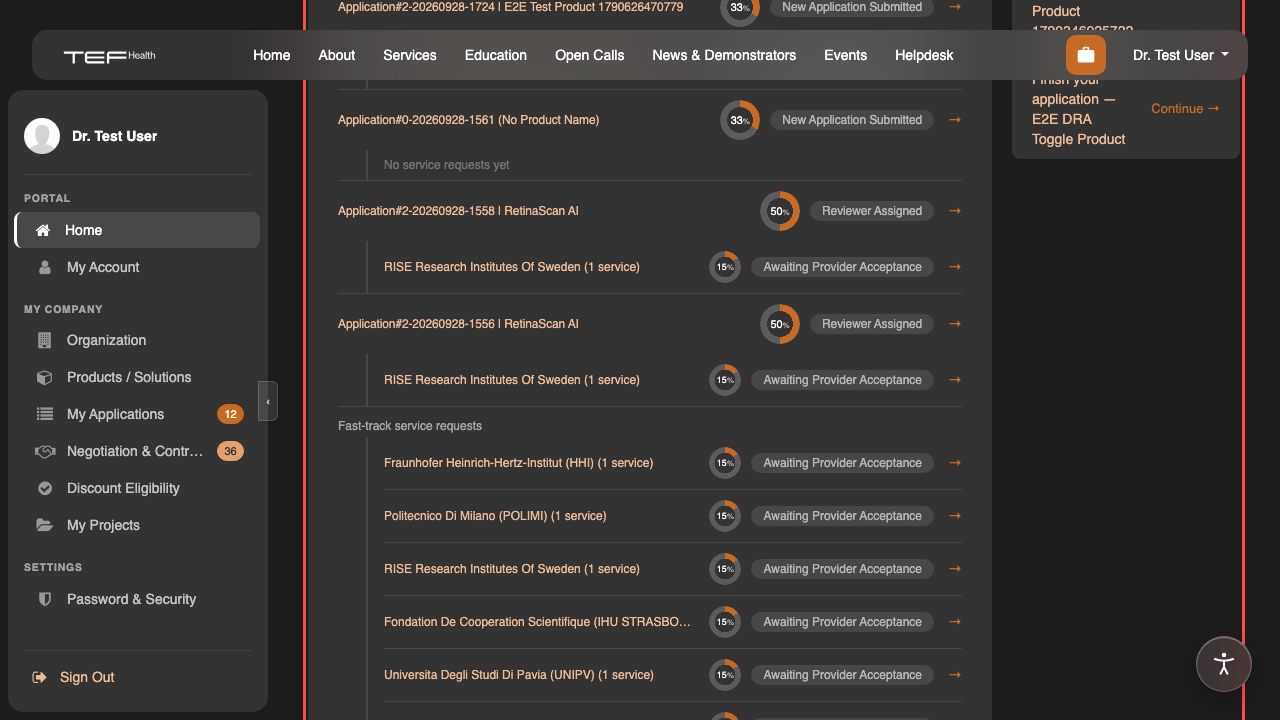
After signing in you land on My Dashboard at /my/home. It brings together your applications and their service requests (each with a progress ring and status), your company-profile completeness, your discount eligibility, and anything that needs your attention.
Where things live
| You want to… | Go to |
|---|---|
| Register / log in (self-service) | /web/login |
| Register via the enquiry form | /get-in-touch |
| Review your profile | /portal/my/account |
| Request a higher role | /portal/access-request |
| Confirm your institutional email | /my/email-check/resend |
Institutional email check
If you hold a TEF role, you confirm your institutional email address every 90 days — see Confirming your institutional email. One click keeps your access.
Automatic log-out
For security, you are signed out automatically after a period of inactivity — see Automatic sign-out. Just log back in to continue.